Built by an owner, for owners

Your whole service company. One app. Zero chaos.

Simple out of the box, with the power there when you switch it on. Dispatch, the FieldSI app for techs, quotes, agreements, projects, job cost and billing on one set of live data, from the first call to the paid invoice.

FieldSI dispatch board with a lane for every tech
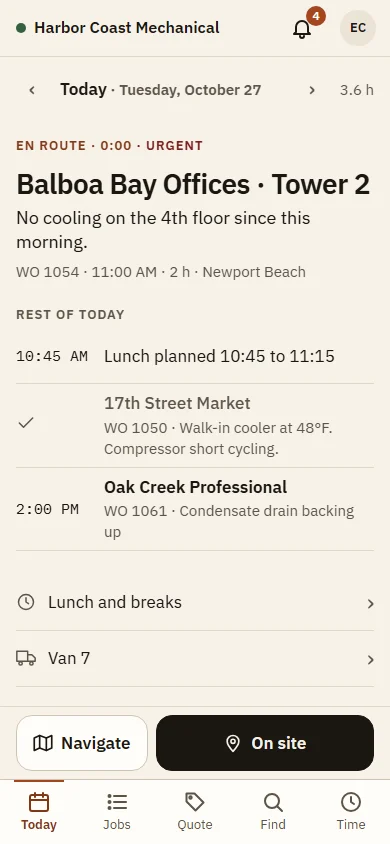
The FieldSI app on a phone showing a work order

Built by an owner, for owners. Easy for the office, the field, billing and your customers.

FieldSI comes from someone who built an HVAC service company from the ground up, so every workflow is the one a real shop already runs: take the call, dispatch, do the work, close out, pay the crew, bill the customer. The office, the field, billing and your customers work the same records, each on the screen made for them.

Simple by default

Starts simple. Grows with you. One switch at a time.

Day one you get the board, the app and billing, and every screen shows the next right thing, clean and clear. Construction, tech skill profiles and each reminder turn on when you want them, and stay out of the way until then.

  • Modules on their own switch: Construction, tech skill profiles and each My Day reminder.
  • Fifteen built in user types plus your own, each a set of permission switches with a reach.
  • Keep your QuickBooks setup and FieldSI syncs with it, or keep your books in FieldSI. Your pick.
Dispatch, the FieldSI app and billingReady on day one
Construction projectsBudgets, pay applications and WIP
Tech skill profilesRatings, certs and fit on the board
My Day remindersEach kind on its own switch
Books in FieldSIOr keep QuickBooks, your pick
Tech screensSwitched on per person

Sample settings

Show the settings that make it your shop

The rules that make your shop yours are settings, not custom code. Each one lives under Settings, with a plain name, and takes effect the moment it is saved.

People and permissions

Your own user types on top of the fifteen built in, each a set of permission switches by area with a reach: own accounts, own crew or everyone. An extra for one person. Where each type lands: the office, the sales tools or the FieldSI app.

Documents

Quotes, PM proposals, invoices, credit memos, purchase orders and pay applications each with their own title, intro, closing text, terms and pay terms, and switches for the logo, line detail, photos and the signature block. Proposal templates with your logo, colors, fonts and a cover page.

Pricing and markup

Rate tables and labor classes, contract and standard. Material margin bands by cost. The default quote margin. A PM markup per customer or company wide. Filters rolled into the price or broken out. The billing schedule a proposal starts on.

Pay and time

Live, manual or hybrid time capture. Time card review on or off, and the hours before a lunch is owed. Overtime rules and the pay period. Burden layers on each person's pay. A union agreement with its scales and funds.

Workflows

Scope of work presets. PM task templates with the checklist steps under each task, the equipment library, and safety and startup checklists. The callback window. Whether a customer signature is required at closeout, and whether techs can add units in the field.

Reminders and modules

Each reminder and module on its own switch: the Construction module, tech skill profiles and each kind of My Day reminder. Teams, vendors and warehouses, one per van.

The office

Every job and every loose end, where you can see it.

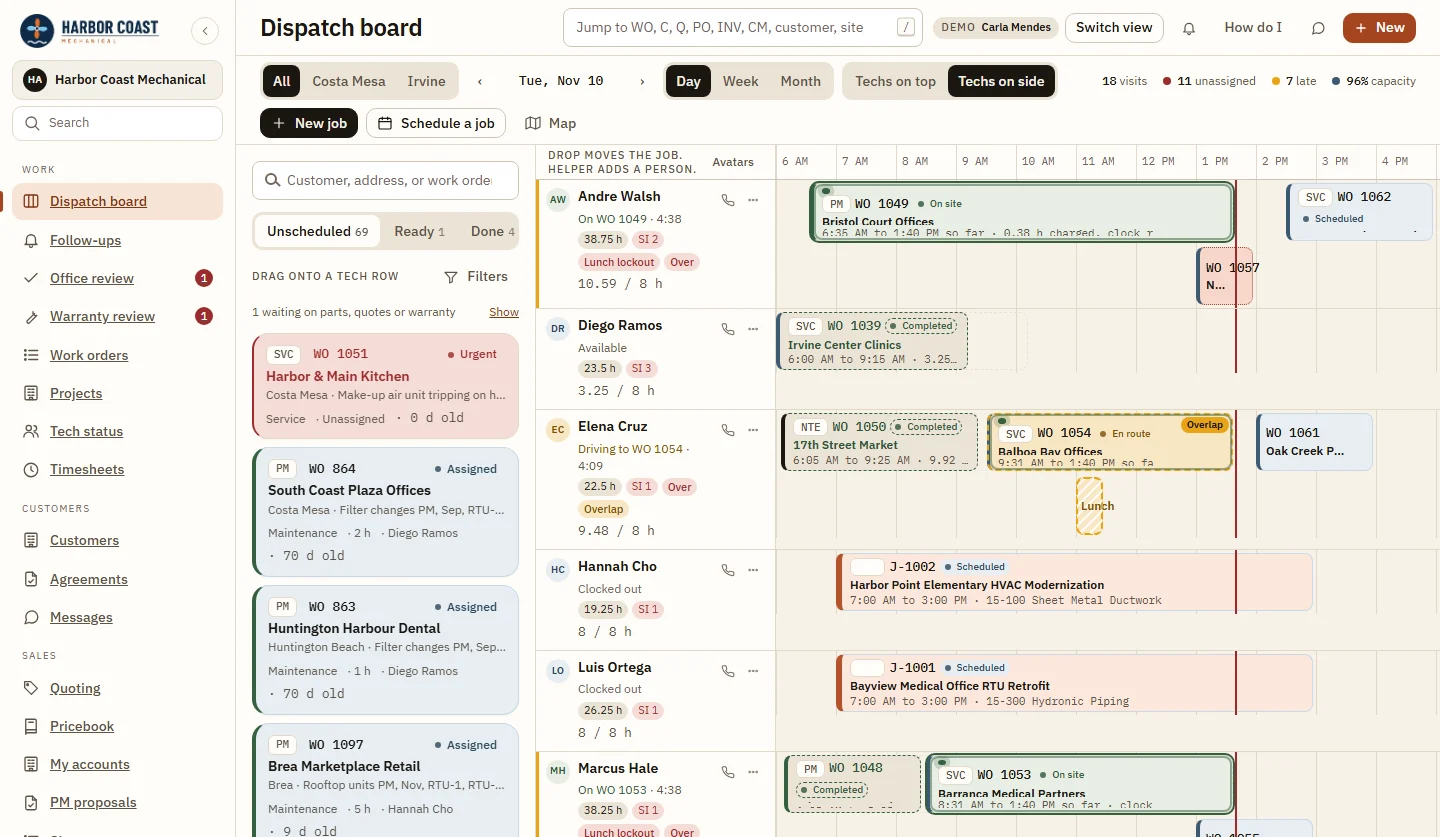
Dispatch board

The whole day on one board. Every hour accounted for.

See each tech's booked hours against their shift before you add one more call. Lunches, time off and the heads up from the field sit right on the lane.

Service calls and project crew days share one board. Drag a job onto a time and the board checks lunches, time off and overlaps first.

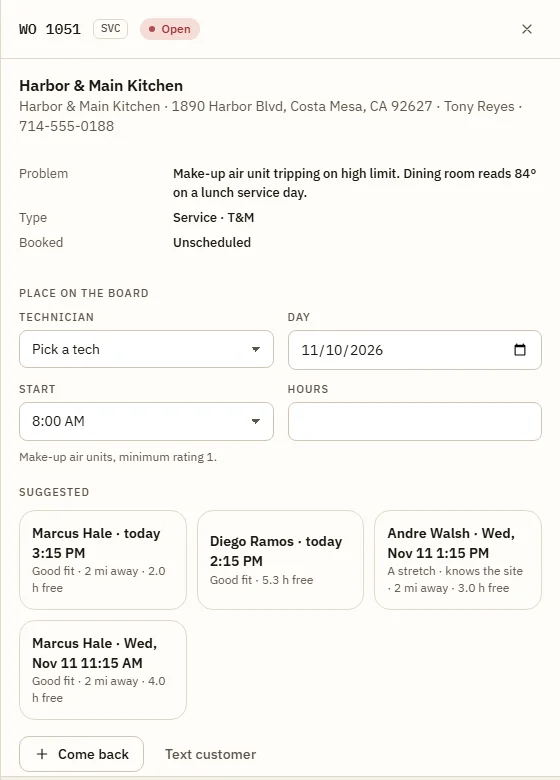
Suggested techs on every job, ranked by free hours, distance, who knows the site and skill fit, with the reason shown. You place the job.

The dispatch board on a busy Tuesday with live status, booked hours against the shift, an Over flag and a lunch lockout
A job sheet with its Suggested list of techs and times, each with fit, distance and free hours
Watch the board work
DispatchToday12 visits · 1 late · 86% bookedLive
Unscheduled · 4
WO 1066 · No heatBristol Court · 2 h
WO 1064 · PMSanta Ana Gym · 3 h
WO 1062 · QuoteTustin Auto · 1 h
WO 1060 · Leak17th St Market · 2 h
Tech
7a89101112p1234
Marcus H.On WO 1050 · 42 min7.5 / 8 h
WO 1044PM doneWO 1050On siteWO 1061Leak check
Elena C.Driving to WO 10596.5 / 8 h
WO 1047InstallWO 1059En routeQ 2210Quote
Andre W.Wrapping up, free 11:308.5 / 8 h · Over
WO 1052UrgentWO 1055BoilerWO 1063PM
Priya S.Available3 / 8 h
WO 1041PM doneWO 1066No heat
Luis M.Off today · PTO0 / 0 h
WO 1066No heat · 2 h
  • Live status under each name: on a job, driving, wrapping up, available.
  • Hours booked against the shift, with an Over flag before anyone burns out.
  • Lunches, PTO and time off on the lane, so nothing gets booked on top.
  • Every tech's week at a glance on Tech status: booked against charged hours, backlog and callbacks.

Mockup with sample data

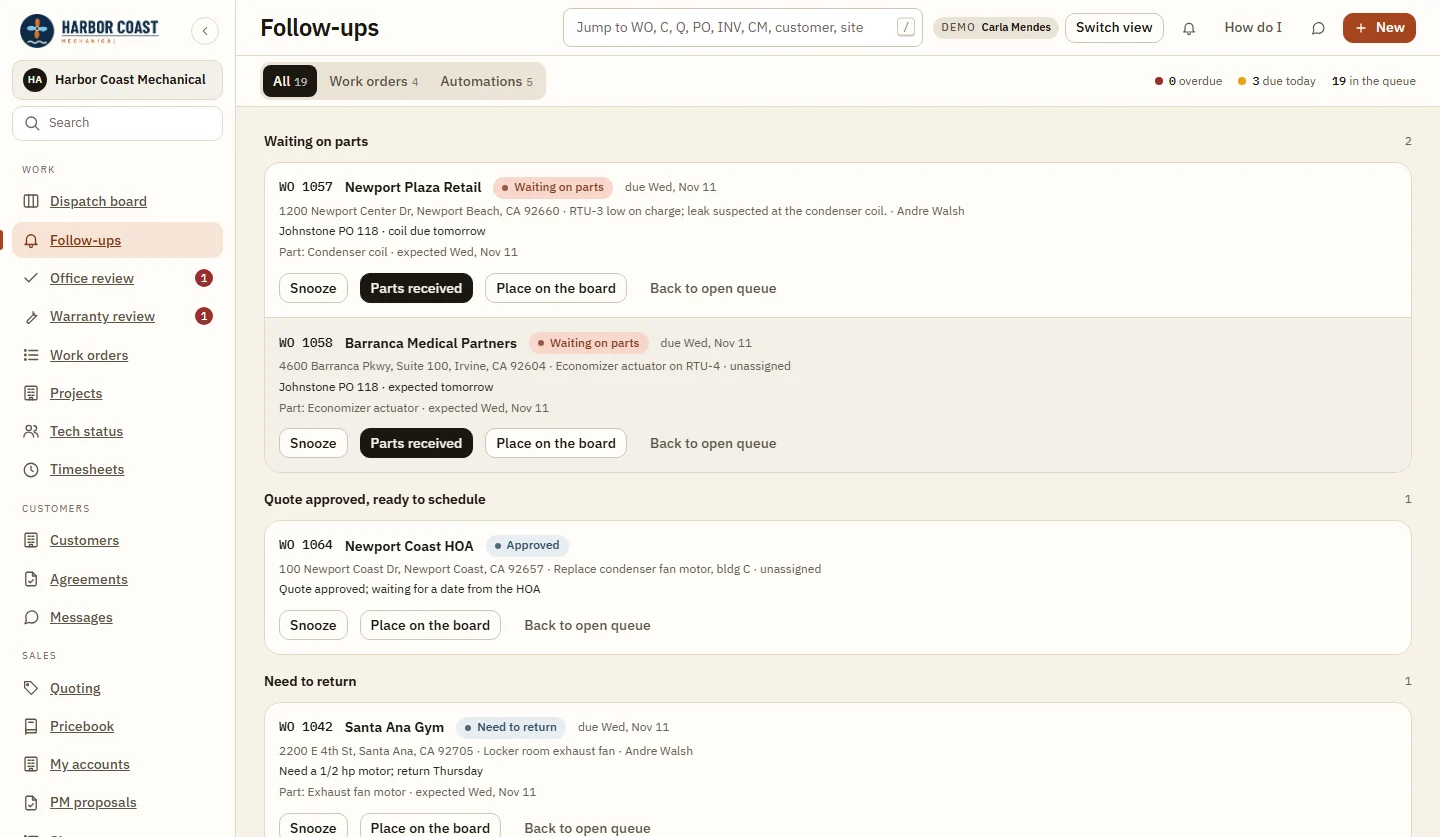
Follow ups

Every loose end in one list.

Parts on order, quotes waiting on a yes, return trips and warranty calls land in one queue, each with a due date.

Parts came in? One tap and the job is back in the open queue. One more places it on the board.

A sent quote gets its follow up date on its own, and the counts at the top show what is overdue and what is due today.

The Follow ups queue with jobs waiting on parts, a quote approved and ready to schedule, and the overdue and due today counts

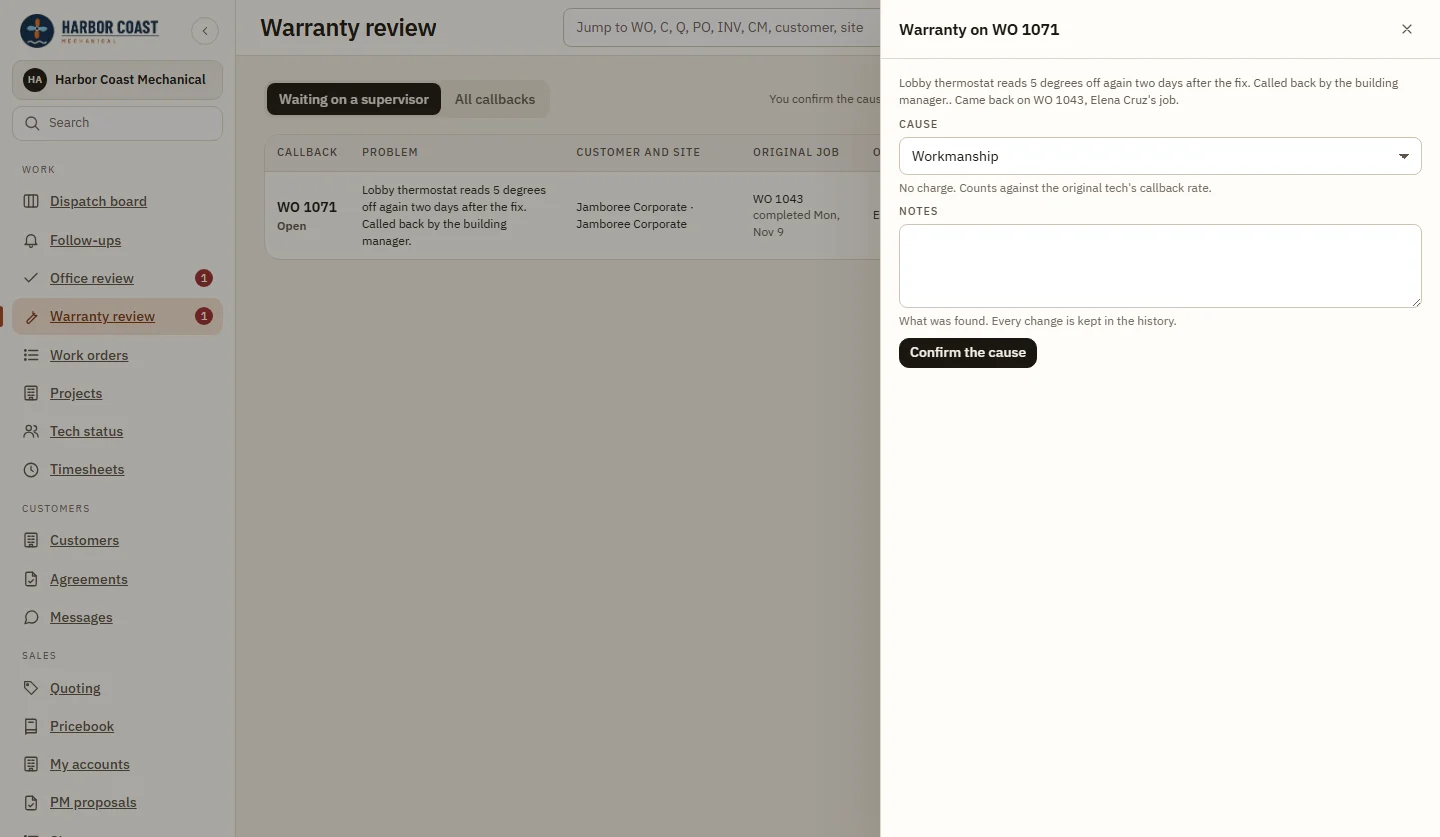
Warranty review

Know right away when a job comes back.

A job that comes back is flagged the moment it is opened inside your callback window, and the original tech's supervisors and foreman are notified.

A supervisor confirms the cause: workmanship, a manufacturer part, a customer issue or unrelated.

Billing follows the cause, so nobody gives away a no charge by accident.

Warranty review with a callback waiting on a supervisor and the confirm the cause sheet open

Screens from our demo company, Harbor Coast Mechanical.

The field

On the phone or tablet they already carry.

The FieldSI app

Big buttons. Zero paperwork.

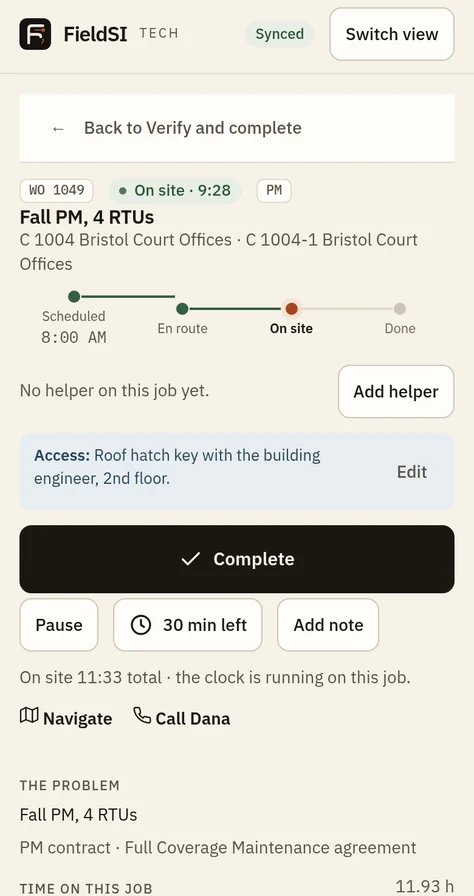
In the FieldSI app the tech sees only their own day: the job, the address, the unit, the checklist and the budget. Never a sell price.

  • En route, On site, Pause run the clock, so the timesheet writes itself.
  • Checklists and photos on the job, findings straight to the office.
  • 30 min left tells dispatch when the next job can start.
Tuesday · 4 jobs · 6.5 hMy day
WO 1059 · ServiceScheduled
RTU-3 not cooling
Oak Creek Professional · 6400 Oak Canyon, Irvine
On site00:00
En routeOn sitePause
Checklist0 of 4
  • Check refrigerant pressures
  • Test capacitor and contactor
  • Photo of the nameplate
  • Findings and work done
Job budget3.0 h · 0.0 used
30 min left sent. Dispatch sees: Wrapping up, free about 2:40 PM.

Mockup with sample data

The tech app

One button. Always the next right thing.

Built for the work in front of you: the screen shows what you need right now, and nothing else. Big buttons for gloves, readable in the sun, and the timesheet writes itself.

The job fits on one screen with one main button, four tiles and a More, so a tech always knows what to tap next.

The tech screens switch on per person, and the FieldSI app runs on the phones and tablets your techs already carry.

The tech Home screen: the current job, the rest of the day and one main button
The tech Home screen

SI in the field

A second opinion on the roof that shows its work.

Nothing here invents a number. SI reads your manuals, your closed jobs and your techs' tips, cites every claim, and says so when nothing on file covers it.

Nameplate scan

Snap the nameplate. The unit fills itself in.

Point the camera at the plate. The scan reads it and fills in the make, model and serial, the tonnage, voltage and phase, the refrigerant, MCA and MOP, and works out the unit's age from the serial date code. A field it was unsure of is marked for a second look.

Works everywhere a unit is added: the PM proposal survey, a tech adding a unit at the site, and the What I know card on a diagnosis.

On a PM proposal the price builds from your equipment library: the tasks, the minutes by tonnage and the filters.

PM proposal · SurveyAdd a unit
Model
48XL-D08A2
Serial
4821G30177
Type
Package unit
Tons
7.5 · R-410A
Priced from the library4 visits a year
12 package units, filters included$9,840
Sample data

SI Troubleshoot

One check at a time, basics first.

It starts from what you have on file: the manuals you upload, the fixes from your own closed jobs, your techs' tips, and the unit itself: make, model, age from the serial, refrigerant and its last jobs.

Power, thermostat and airflow before anything else. Then the readings: superheat, subcooling and delta T computed and flagged against the conditions.

A cause only when the evidence backs it, and every step cites the manual page, fix record or tip behind it. When your own sources run thin, SI searches the web for that model, with the customer's name and address left out. Yes finds the part. No goes back to the checks.

The verdict writes the work description, the customer summary and the unit's history, so the next diagnosis on that model starts smarter.

WO 1059 · RTU-3 · RoofSI Troubleshoot
Carrier 48TC7.5 tonR-410A2 calls this year
Fan runs, compressor won't start. Calling for cooling.
24 V across the contactor coil? Power and the call first, every time.
Yes, 24 V. Contactor pulled in.
Run capacitor reads 31 µF against 45 rated: low. Likely cause: failed run capacitor, 85%.
  • Power and 24 V
  • Airflow and filter
  • Capacitor reading
Carrier 48TC manual, p. 123 fix recordsKnown issue Does this match what you see? Yes · No · Not sure
Sample data
Show the rest of SI and the automations

The rest of SI, and the automations.

SI Parts

Names the exact part, OEM only when a source spells it, universal crossovers by specs. Finds it in order: my truck, the nearest other truck, the shop, the closest supplier branch. One tap to use it, request it or order it.

SI Brain

Ask SI on any unit or job. The answer comes from your uploaded manuals, closed jobs and techs' tips with every claim cited, and a plain refusal when nothing on file covers it.

My Day reminders

A briefing and cards from the real records: parts ready for pickup, PMs due, a job done but not closed, a timecard gap before the payroll cutoff, a quote unanswered, van stock low, and "remind me to" notes. Pings on the lock screen on a phone that allows notifications.

SI Voice

One big mic on every SI screen in the FieldSI app, push to talk or hands free. Status, time, parts and questions by voice. Every write is read back and confirmed before it lands.

Talk, don't type

Techs dictate the description of work. Clean up rewrites shorthand into a write up the customer can read, keeps every fact, and waits for Accept.

Receipt to purchase order

A photo or PDF of a receipt, vendor quote or invoice fills the vendor and the lines on a PO in the FieldSI app, and stays attached.

PM billing on the 1st

Every maintenance visit due this month gets its work order on the 1st. Auto Bill contracts get one draft invoice per contract, sent in bulk. On demand visits invoice the moment they close. Every run is logged.

Texts to your customer

An on my way text with a live tracking page when the tech taps En route, and the service report with photos when the job is done.

Sales tax from the address

A new site looks up its California rate from the CDTFA by street address, then by map point. The rate is frozen on each invoice and reported by jurisdiction with a CSV. Refresh tax rates rechecks every site.

QuickBooks Online

Connects to QuickBooks Online today. Customers and sites push as customer and sub customer, matched by name first. Sent invoices push with their lines, number, dates and terms, the total checked to the cent, with a sync log and Retry. More accounting and ERP platforms to come.

SI Insights and known issues

First time fix rate, callbacks within 30 days, time to diagnosis and where SI was wrong, by tech and overall. Three fixes with the same model, symptom and cause propose a known issue card the office approves.

Small things that run themselves

Quotes expire on their valid until day. An address with a typo gets one suggestion, marked as not postal verified. Dispatch notes push to the lock screen on a phone that allows notifications. A "How do I" helper answers from FieldSI's own notes with a Take me there button.

Sales

From the finding to the signed agreement, with no retyping.

Quoting

From finding to signed before lunch.

Start a quote from any work order. The unit, the findings and the photos come with it.

Pricebook driven: your parts, your labor rates, your margins, with the profit live as you build.

Repair or replace as options. The customer approves from a link with a typed name, and the job is ready to schedule.

Sending the quote sets its follow up date, and it expires on its valid until day.

Quote 2210From WO 1059Oak Creek Professional · RTU-3Draft
Replace compressorRecommended
ItemQtyPrice Compressor, 7.5 ton, 460/3pricebook1$3,890 Filter drier, R-410Apricebook1$96 Refrigerant, R-410Apricebook18 lb$594 Labor, 2 techsrate table9 h$1,755 Crane, half day1$145
Margin 0%$0
Send to customer
APPROVED
Customer link
Oak Creek Professional

Waiting for the quote

Replace compressor $6,480

Approved by Sam P., Facilities

Typed name · Oct 21, 10:48 AM

Mockup with sample data

PM proposals and site surveys

Walk the roof, scan the plates, send the proposal.

Survey the site with nameplate scans. The price builds from your equipment library: the tasks, the minutes by tonnage and the filters.

Options and templates with your logo and a cover page, and the customer signs online.

Sales forwards it, operations approves it, and the signed proposal becomes the agreement with no retyping.

Your reps see their own accounts and prospects. A prospect becomes their customer when operations approves the proposal.

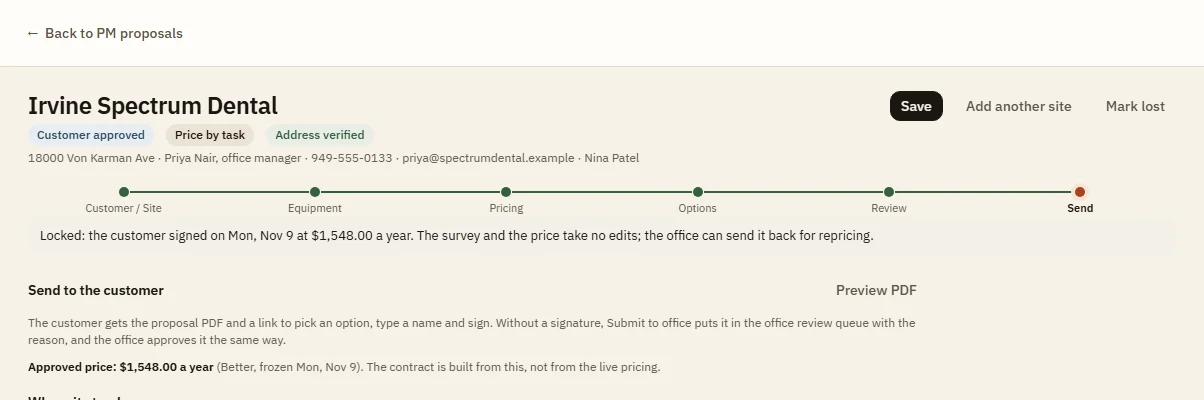
A PM proposal through its six steps, locked after the customer signed, with the approved price

Maintenance agreements

Package units on one roof or a central plant. Done right.

Build the contract from the equipment library: the tasks, the minutes by tonnage and the filters, priced by task or by group.

Mix the schedules. Rooftop units every quarter, the chiller and the boiler once a year, filters every month, each group in the months it runs.

Add your subs and bill it how the customer wants: Auto Bill on the 1st, installments or on demand when the work is done.

PM work orders are made on the 1st, straight into the backlog, and each contract shows its profit.

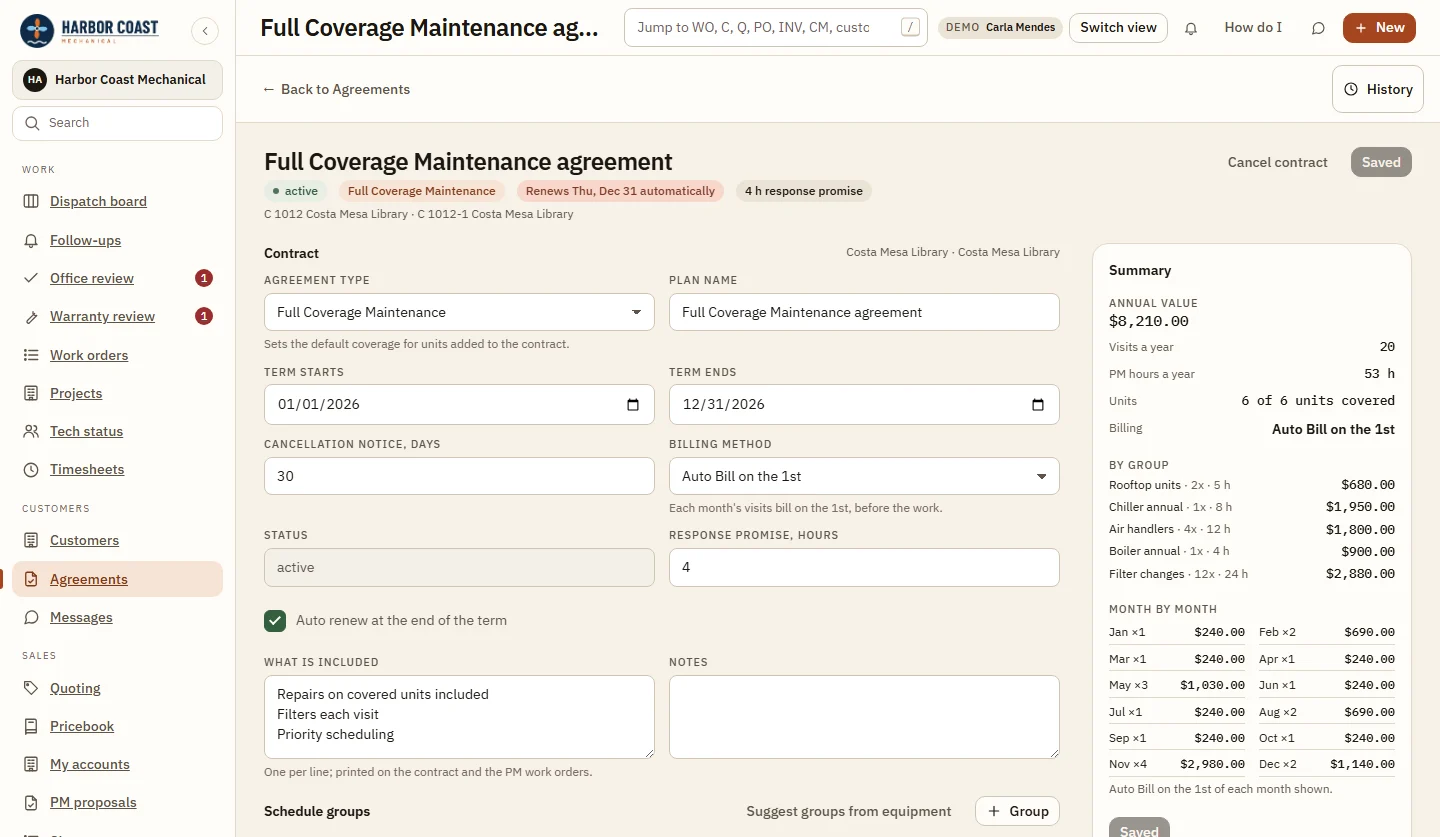
A full coverage agreement for a building with a chiller, air handlers, a boiler and rooftop units, priced by group and month by month
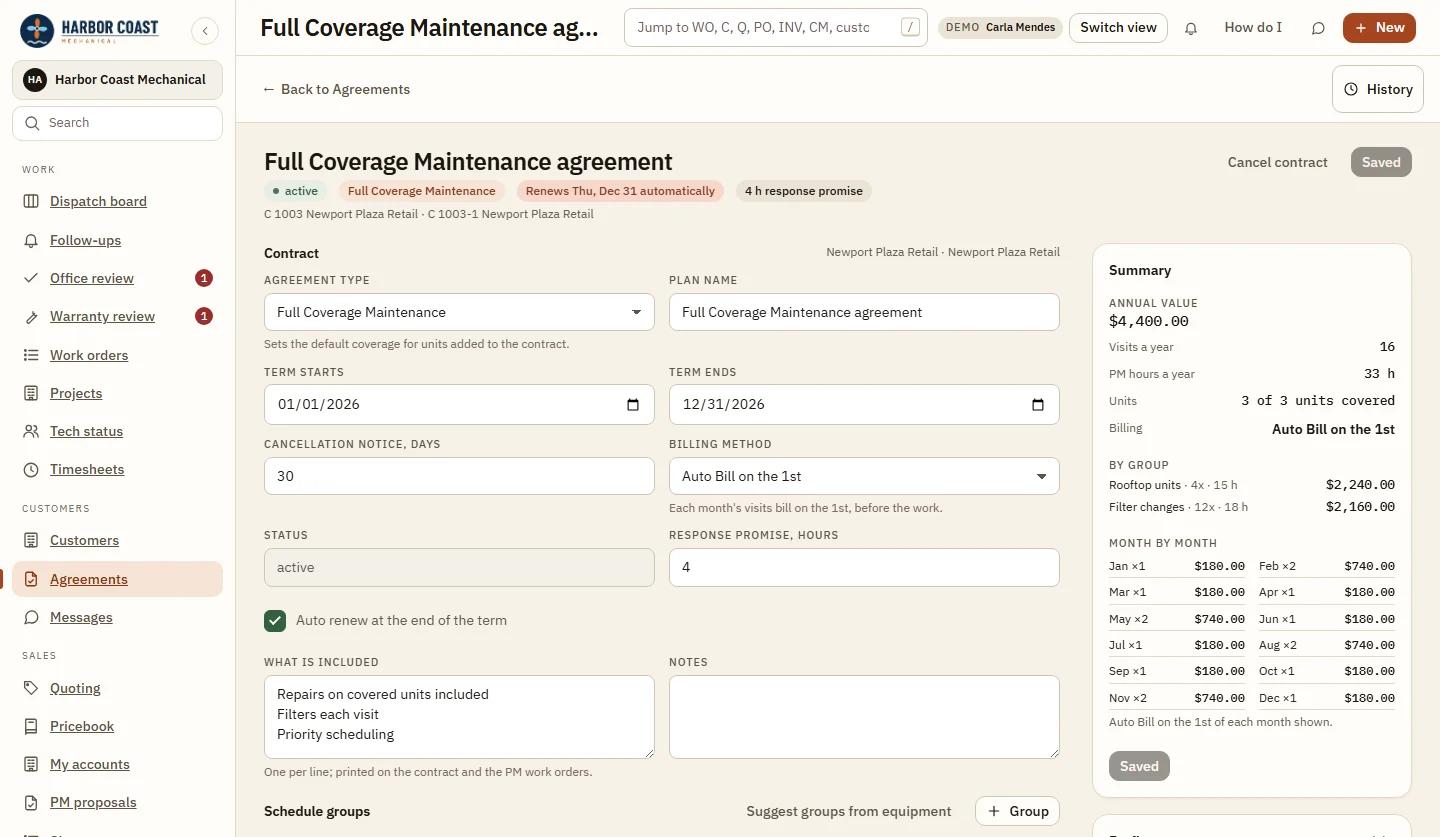
A simple agreement for three rooftop units with quarterly visits and filter changes

Want to see it on your kind of jobs?

Request a demo

Projects and WIP

Know if a job is making money while you can still fix it.

Budget by cost code, change orders that update the budget on their own, and WIP that shows over and under billing at every month close. Bring your estimate in by CSV.

P-1001 · Laguna Hills Medical PlazaActiveTenant improvement · 3 RTUs and ductCosts
Cost codeBudgetApproved COsRevisedCommittedActualUsed
01-100 Rooftop units184,0000184,000178,400176,92096%
02-200 Ductwork96,5008,640105,14061,20058,31055%
03-300 Controls42,000042,00039,80012,45030%
04-400 Test and balance11,000011,00011,00000%
Pay app 4 · SeptemberSubmitted

Completed to date $412,300 · Retention held 10% · Due this period $58,500

CO-003 · VFDs on AHU-1 and AHU-2Approved

+$8,640 on 02-200 · 3 days added

J-1001 · Laguna Hills Medical PlazaStartup · RTU-1 to RTU-4
Clock01-100 · 2:14
Checklist4 of 5
  • Rotation and amps on each unit
  • Charge checked, subcooling logged
  • Economizer stroke
  • Photos of each nameplate
  • Owner training done
Sign off

Accepted by Dana M., GC superintendent

Sample data from our demo company, Harbor Coast Mechanical.

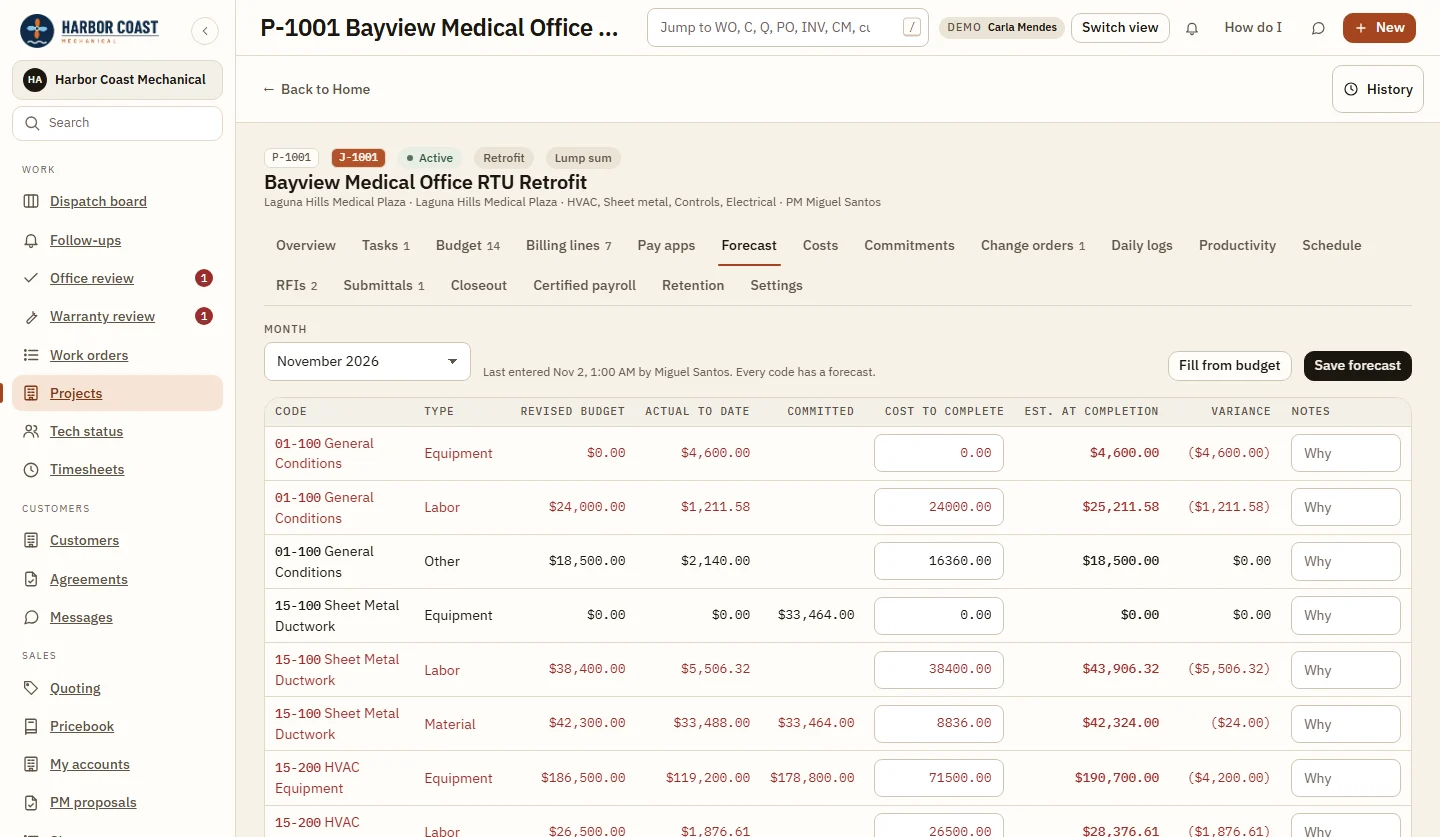
WIP and the forecast, by cost code.

Overages show while the job is live. Codes past 90 percent shade, and a pay application line past its value turns red.

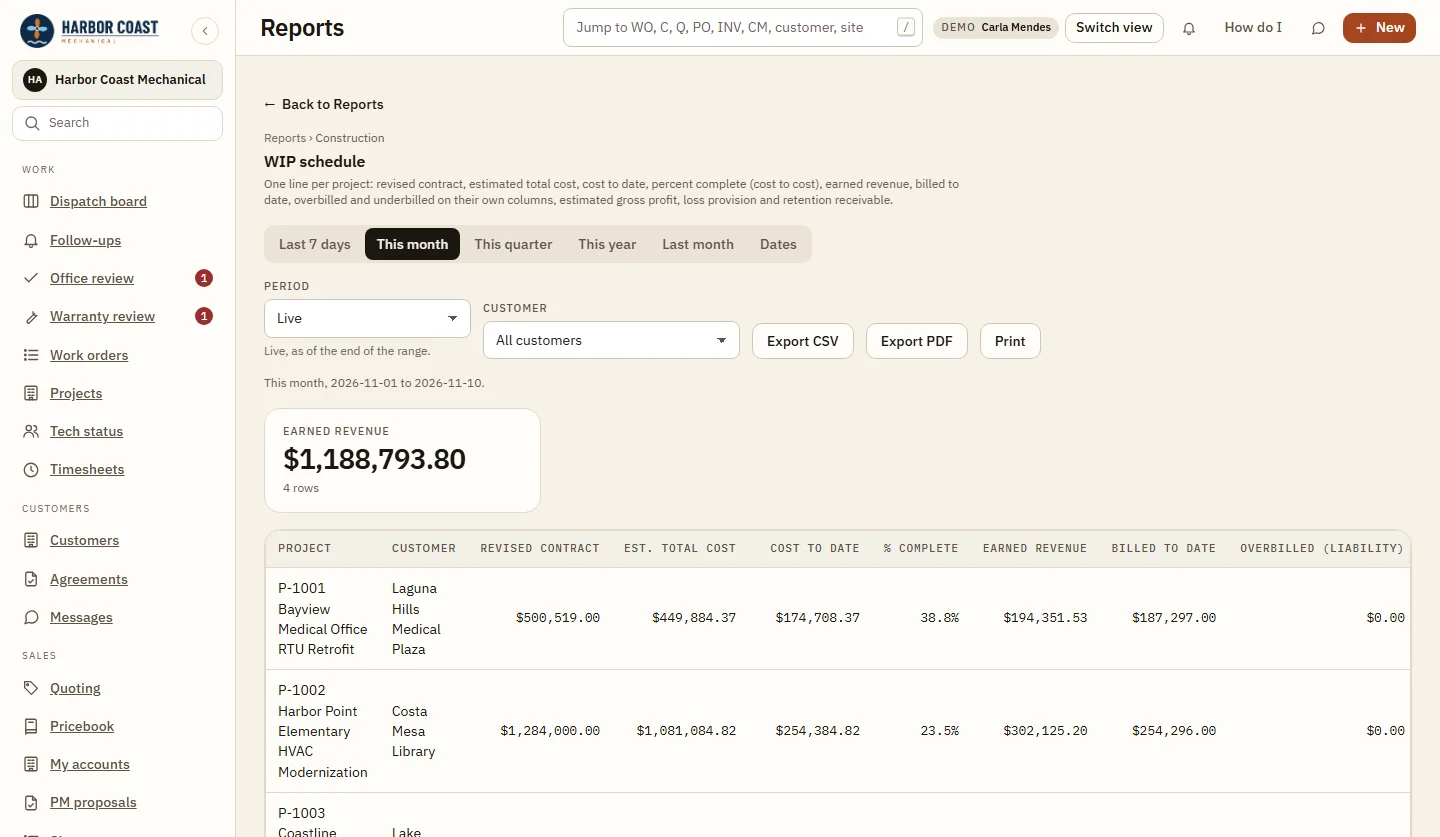
WIP is cost to cost, with over and under billing on their own columns, never netted, and a snapshot at each month close.

The PM enters the cost to complete by code, and labor costs at the real wage plus burden.

The WIP schedule report: revised contract, estimated total cost, cost to date, percent complete, earned revenue and billed to date by project
A project's Forecast tab with cost to complete, estimate at completion and variance by cost code
Show everything in Projects

Budget by cost code

Labor, material, subcontract, equipment and other, with hours. Type it in or import a CSV; the dry run names every problem on its line before anything is written. Approve the budget and the original lines lock.

Schedule of values

Billing lines that must equal the contract to the cent before they lock. Retention terms per project: the percent, the drop at the reduce at point, stored materials.

Change orders and RFIs

A log with pending, approved and rejected totals and aging. An approved change order writes its own budget lines, so the revised number is always original plus approved, never a stored total.

Pay applications

The G703 grid: scheduled, previous, this period, stored, percent, balance, retention held and released. A line past its scheduled value turns red. Submit writes a real invoice and prints the G702 and G703 as a PDF.

Job costing and WIP

Committed and actual by code, shaded past 90 percent. Cost to cost percent complete, earned revenue, over and under billing never netted, and a month close that keeps a snapshot. Backlog and cash flow by job.

Jobs on the board and in the app

A project is J-1001 to the field. Dispatch schedules a span of days for a crew with the same rules as a work order. The tech clocks to a cost code, switches codes midday, and the taps wait for signal.

Job tasks with sign off

Startup, test and balance, inspections and punch visits as tasks under a code, with a checklist, photos and the GC's or owner's signature. Done asks for every item answered.

Daily logs and the punch list

Weather, our crew's hours from their time entries, sub crews by headcount, work performed by voice, delays, quantities installed, photos and visitors. Submitted from the FieldSI app, approved in the office.

Subcontracts and lien waivers

Subcontracts with their change orders and insurance certificates. An expired certificate or a missing lien waiver flags a payment before it is marked ready.

Certified payroll

Prevailing classifications with the fringes on the project. The WH-347 week is computed from the time entries with the statement of compliance, and the eCPR export follows the DIR format.

Closeout and warranties

A closeout checklist that gates the retention release, each sub's release once its final waiver is on file, and warranties by scope that flag a service call on that site as under project warranty.

Project roles

Project Manager, Construction Manager, Project Accountant and Superintendent types out of the box. Amounts are stripped on the server for anyone without the money permission.

Tech skill profiles A switch you turn on

Know what every tech is great at, from the work they actually did.

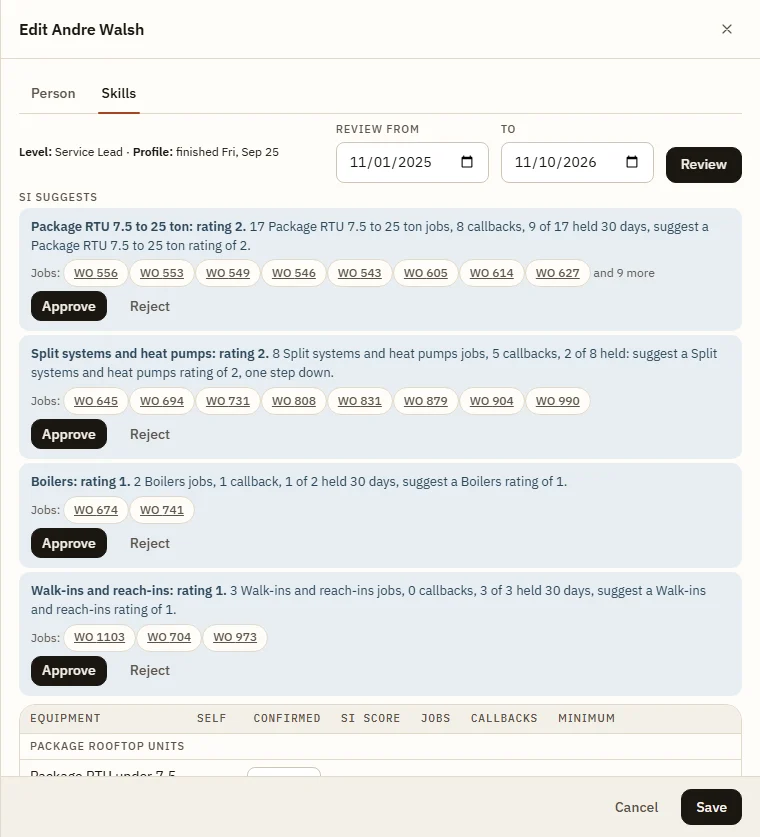
SI scores each tech by equipment type from their real jobs, next to their own rating and the manager's confirmed rating, with the jobs behind every score.

Certs with their expiration dates, and suggested rating changes and training for the manager to approve.

Dispatch shows the fit: a good fit, a stretch or below, and asks for a reason before placing a tech below the job's minimum.

First time fix, callbacks within 30 days and time to diagnosis by tech, and a one page annual review that prints from the records.

A tech's Skills tab: SI suggests a rating for each equipment type from the jobs behind it, for the manager to approve or reject

The money side

Real costs in. Real margins out.

Billing and payments

The job closes. The invoice is already there.

Verified hours and received parts become the bill: time and material, not to exceed, quoted or PM.

See the cost, the profit and the margin, then send.

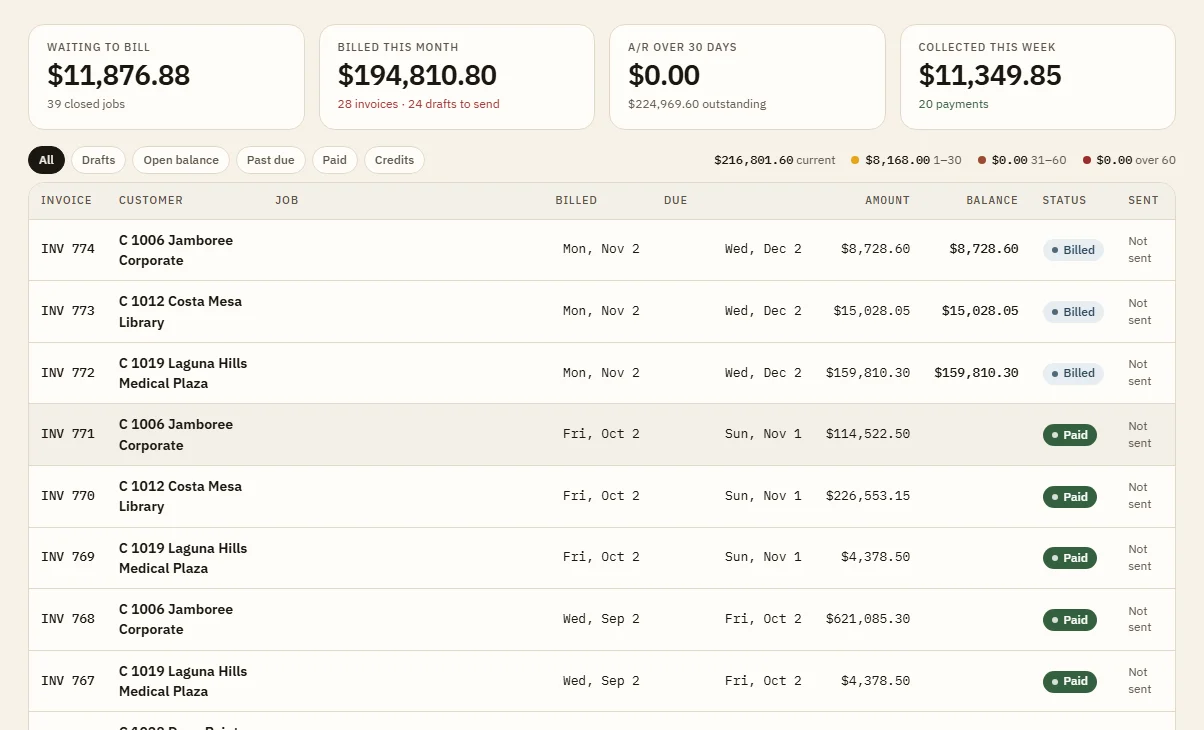
Credit memos, payments, refunds, AR aging and sales tax by site, looked up from the address. Invoices push to QuickBooks Online with the total checked to the cent.

Billing: waiting to bill, billed this month, receivables and collected this week above the invoice list with amounts, balances and status

True job cost

Know what every hour really costs you.

Actual wages plus the burden: payroll taxes, workers' comp, benefits and overhead, on every approved hour.

Overtime and double time done right. The multiplier hits the wage. Taxes follow the wage paid. Flat burden never gets multiplied.

See the real margin on every job, customer and contract before you bid the next one.

Elena C. · one straight hour$69.31 / h
Wage$41.00 Payroll taxes, 11.75%$4.82 Workers' comp, class 5537, 4.86%$1.99 Health, 401k and PTO$7.50 Shop, trucks and office$14.00
Straight$69.31
OT 1.5x$93.22
DT 2x$117.12

Sample data

Purchasing and truck stock

Buy it, receive it, cost it. One tap.

Create the PO from the work order: the job, the site and the tech fill in for you.

Buy for the job or for truck stock. Every van is a warehouse with its own counts and minimums.

Save and receive in one step, and the cost lands on the job before it ever reaches billing.

WO 1059 · Oak Creek ProfessionalNew PO
Buy for
This jobTruck stock · Van 12
VendorCoastal HVAC Supply
Capacitor 45/5 µF2 · $38.40
Contactor 2P 40A1 · $46.20
R-410A, 25 lb1 · $289.60
Total$412.60
Save and receive · $412.60
Received+$412.60

Material cost on WO 1059. Billing sees it at real cost.

Sample data
Show union pay and truck stock

Union ready

Union shop? Built in, not bolted on.

Load the wage schedule once: journeyman, foreman and apprentice scales, PTO, the employer funds and dues.

Every hour costs at the agreement in force on the day it was worked, with the funds flat per hour, the way the trust counts them.

The monthly remittance report is one click: hours, gross, each fund, dues and the total due, as CSV or a PDF ready to sign.

Sample Local · Service agreementIn force
ClassificationWagePTOH&WPensionTotal
Journeyman59.753.7511.079.4889.79
Foreman (115%)68.714.3111.079.4899.31
Apprentice 3 (70%)41.832.6311.570.0060.41
September remittance · 3 members · 480 h
Funds and dues due
$14,083.20

Sample data

Truck inventory

Every truck is a warehouse.

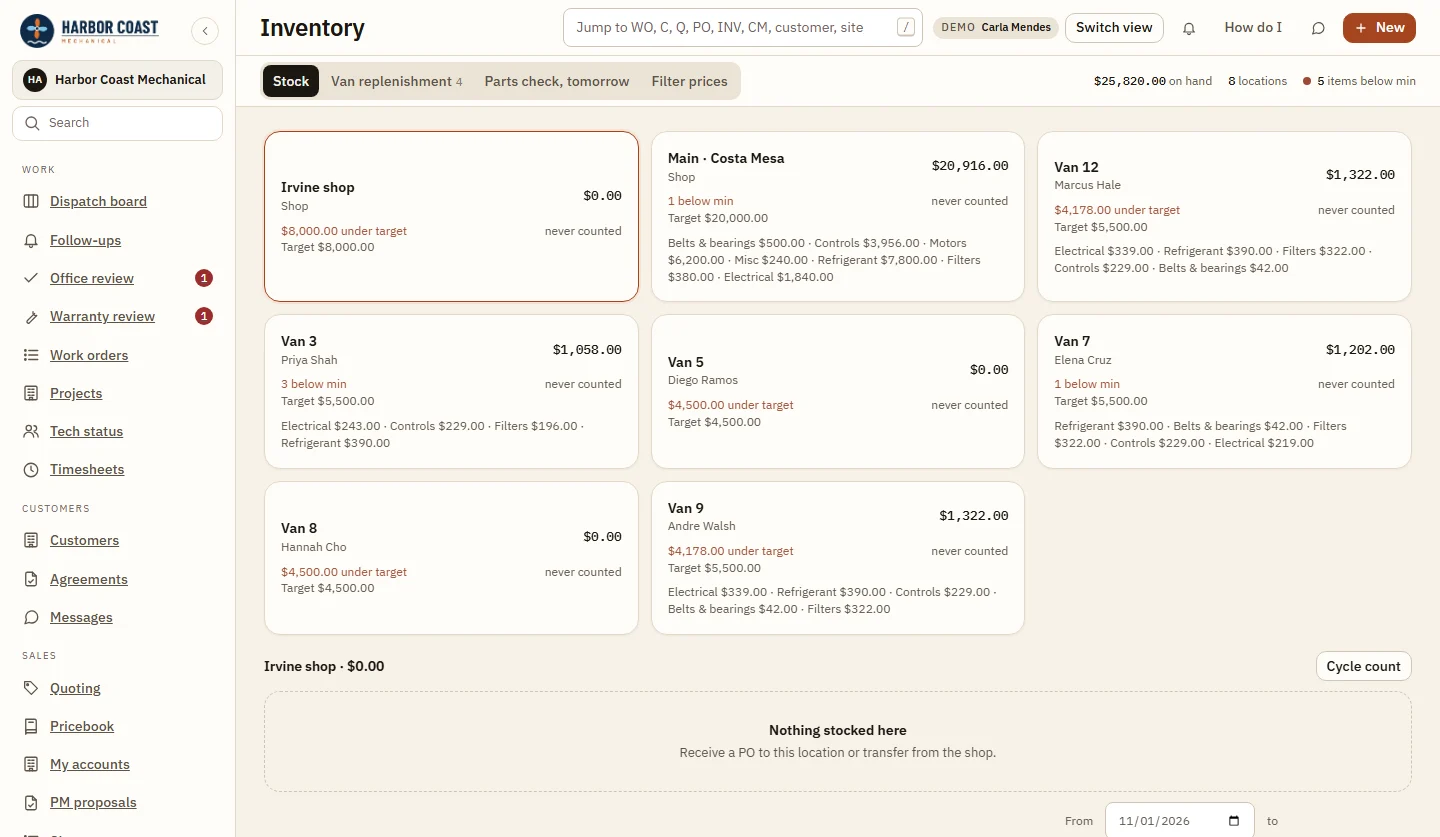
Minimums, cycle counts and a morning replenishment list for each van and each shop.

Vendor invoice matching, returns and credits, and a receipt photo that fills in the purchase order.

Inventory: stock value by shop and by van, with items below minimum and what each van is under target

Reports and dashboards

Every number you need. Your dashboard, your way.

Every report in one list you can search. Pin the ones you live in. Then put the numbers you check every morning on one screen, built the way you run your shop. Profit numbers you can trust, because every hour is costed at the real wage plus burden.

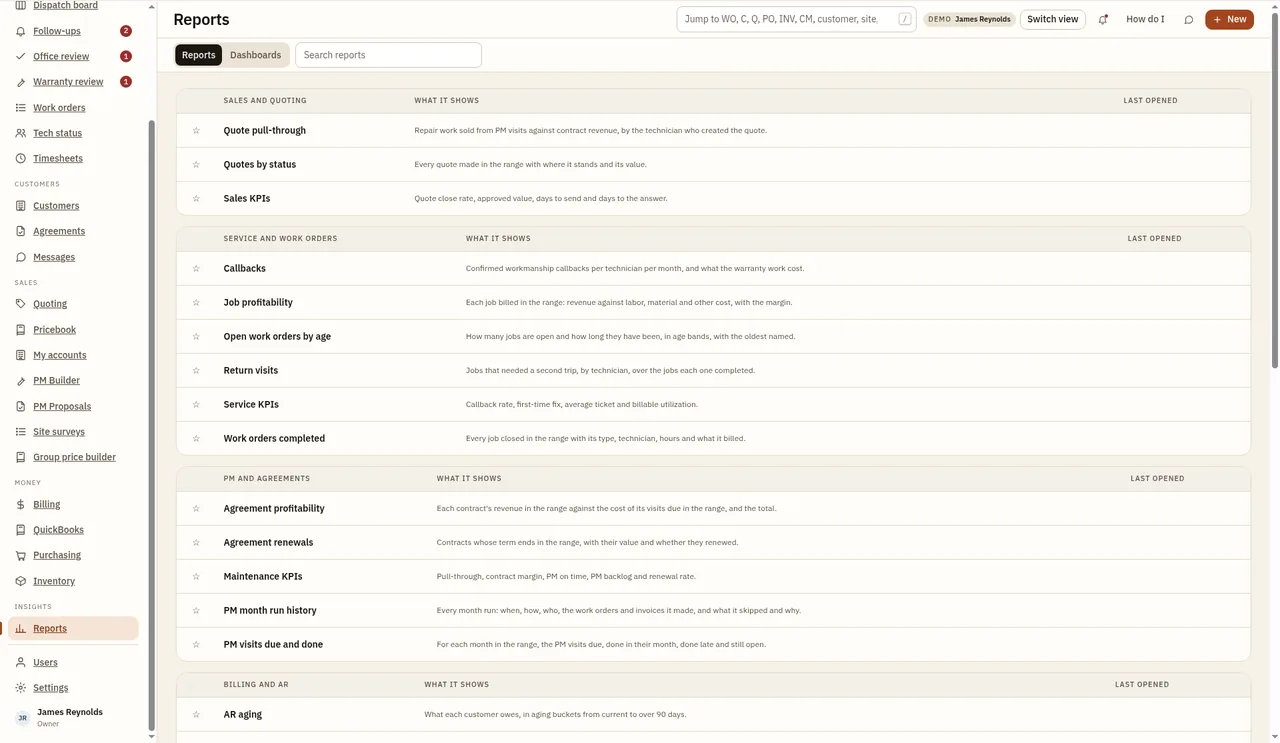
Reports

One list. Every report.

Grouped the way a shop thinks: sales and quoting, service and work orders, PM and agreements, billing and AR, techs and time, payroll, inventory and purchasing, customers, and construction.

Search it or star it. Your favorites stay pinned at the top.

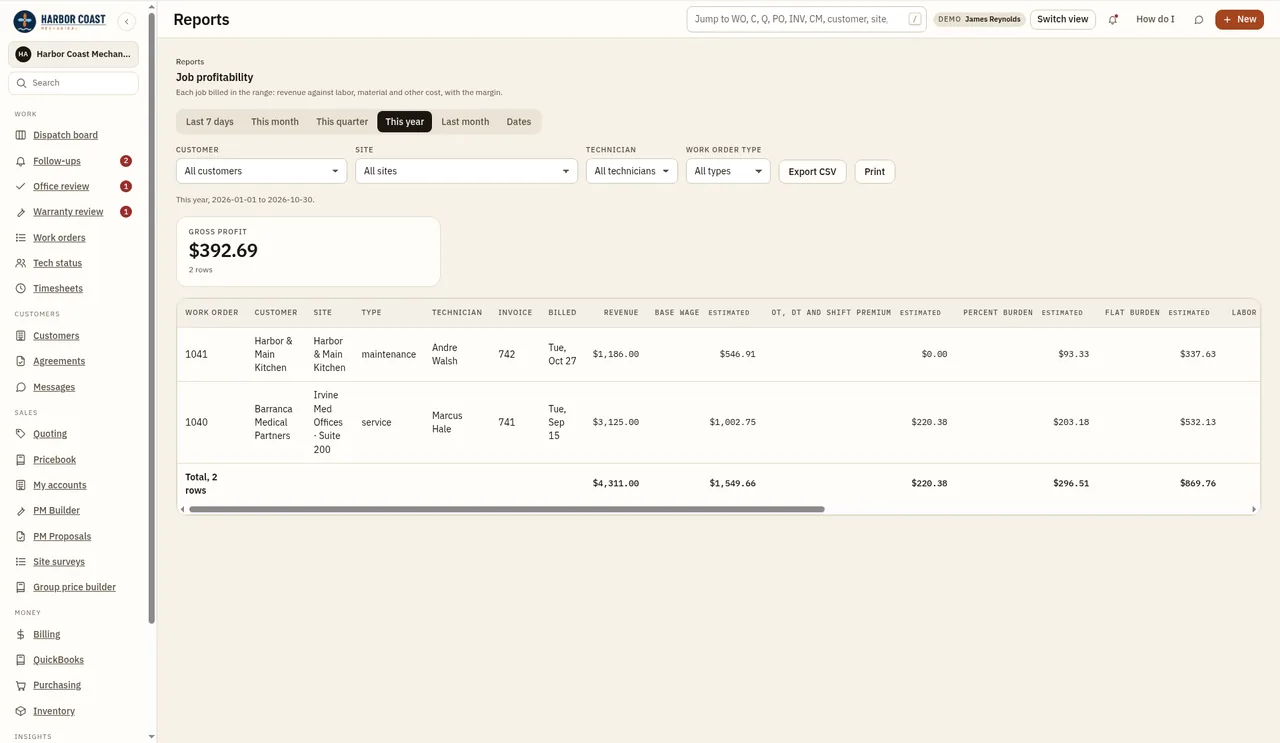
Every report gets its own page: date range, filters by customer, site, tech and job type, sort, a totals row, Export CSV and Print.

Job profitability runs on real wages plus burden. Not a guess.

The FieldSI Reports list, grouped by area with search and starred favorites
The Job profitability report with date tabs, filters, Export CSV, Print and a totals row
Show how dashboards work

Build a dashboard in a minute.

  1. New dashboard

    Click New dashboard and give it a name. Service Manager, Owner, Monday meeting. Your call.

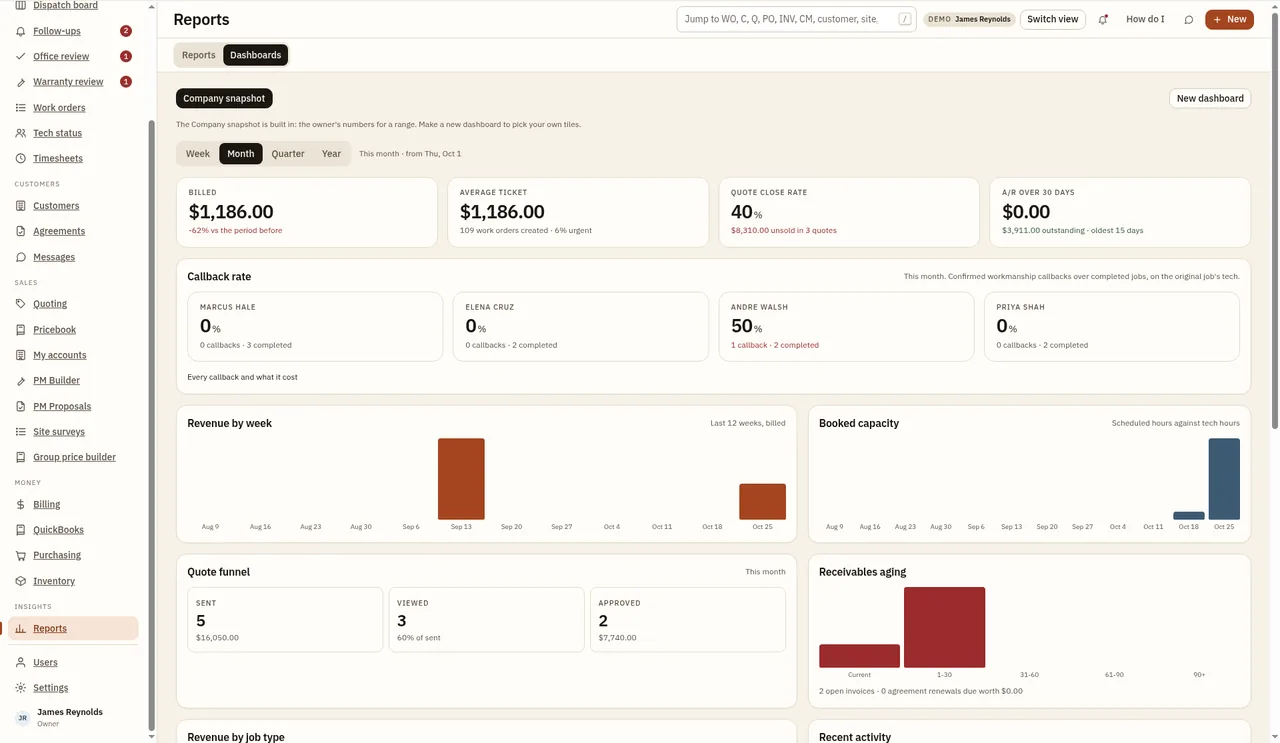
    The built in Company snapshot dashboard in FieldSI
  2. Add tiles

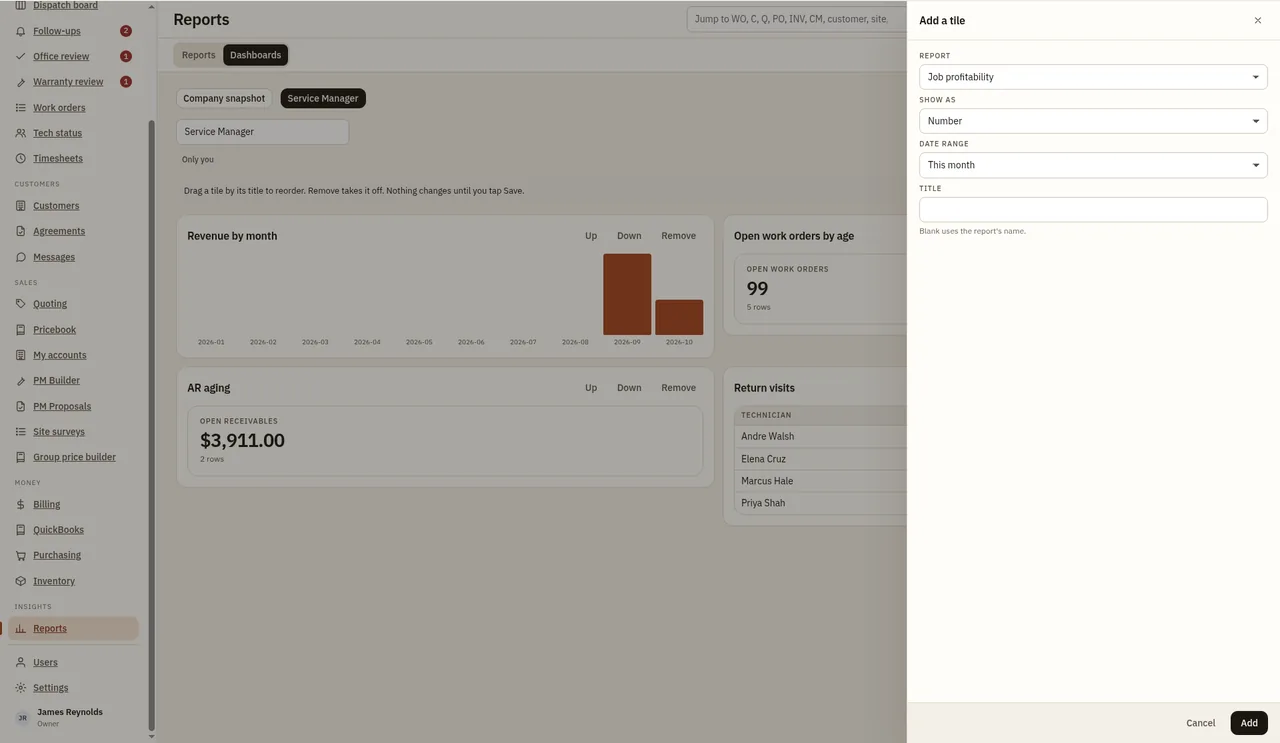
    Pick any report. Show it as a Number, a Small table or a Chart. Pick the date range. Save. Move tiles up or down, or pull one off.

    The Add a tile picker: report, show as Number, Small table or Chart, date range and title
  3. Share it

    Dashboards are private until you say so. Managers, supervisors and admins can share one with the whole company.

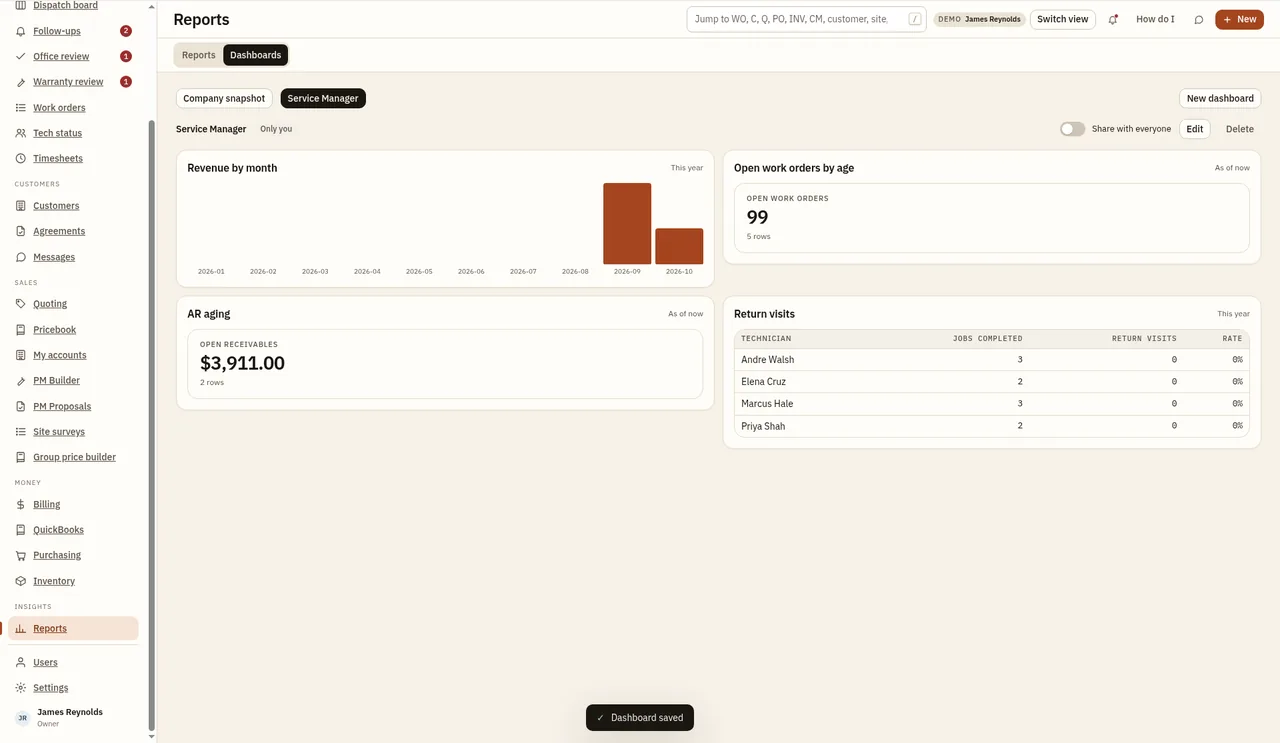
    A finished Service Manager dashboard with four tiles

The Company snapshot

Out of the box: billed with the change, average ticket, quote close rate, receivables aging, revenue and capacity by week, job type mix and the technician scorecard.

The right eyes on the right numbers

Money reports need the margins permission. A tech with reports on their own jobs sees only their numbers. Internal cost is its own permission, stripped on the server.

Sales tax and payroll, ready to file

Taxable, nontaxable and exempt sales by jurisdiction with the invoice detail and use tax. Payroll summary, job cost by customer, job and agreement, and the union remittance.

Screens from our demo company, Harbor Coast Mechanical.

Your books, your pick

Keep QuickBooks, or run it all in FieldSI. Your pick.

Keep your QuickBooks setup and FieldSI syncs with it. Or run everything in FieldSI with the built in general ledger for accurate job cost. Whatever works best for you.

Keep QuickBooks

FieldSI syncs with QuickBooks Online. Customers, sites and sent invoices push across with the total checked to the cent, and a sync log in the office shows every one.

Talk through your books with us

Your customers

What you want your customers to see. Nothing else.

A customer never installs anything or learns a password. Each thing you send them opens from the text or the email, shows that one document, and never carries your cost, your margin or anyone's pay.

Your tech is on the way

When the tech taps En route the customer gets a text with a live tracking page: who to expect, about when, and how far away the tech is right now.

The service report

When the job closes, one tap sends the report by text: the work performed, the photos the tech took, and any findings on the equipment with their photos.

Quotes to review and approve

A repair quote arrives by email with the options side by side and the recommended one marked. The customer picks an option and approves it with their name, and the job is ready to schedule.

Proposals and agreements to sign

A PM proposal or maintenance agreement opens from its link with the equipment, the visits, the price and the terms, and takes the customer's signature on the screen.

Invoices

Each invoice arrives by email with the terms, and its page shows the amount, the balance and the due date. Quoted jobs show the scope and the price; time and material is itemized.

Their equipment, on the report

Findings from a PM visit carry the unit, the tech's note and the photos, so the customer sees what was flagged on which unit and what you recommend.

Two way texting with your customers from the office, each thread next to their open work orders.

Also in the box

Every person gets a sign in. No seat limit.

Access is a user type: a named set of permissions with a reach, such as own accounts, own crew or everyone. Fifteen types come built in, you can make your own, and an admin can grant one person an extra.

  • The jump box: any number, customer, phone or serial in one keystroke.
  • A credit limit and a credit hold on every customer, and the hold actually stops work.
  • An edit history with rollback on every office record.
  • Work orders you can search, filter and export to CSV, which opens in Excel.
  • California rules done right: meals, rests, daily overtime and sales tax from the address.
  • Union and prevailing wage built in, with the remittance and certified payroll.
Show every role
AdminEverything, everywhere, including users and settings.
Service ManagerEverything except user types, company settings and pay rates.
SupervisorThe office with billing, customers, review and settings, reaching every crew's jobs, time and trucks.
DispatcherThe board, the jobs and the crews, time, purchasing and quotes at sell price. No internal costs.
Customer Service RepCustomers, sites, work orders, the board, billing and quotes at sell price.
BillingBilling, the pricebook, contracts and the reports with money.
Accounts ReceivableBilling plus credit limits and credit holds on customers.
SalesThe sales tools on their own accounts: customers, sites, units, PM proposals and site surveys.
MSRMaintenance sales rep: Sales plus every agreement, quotes and reports on their own accounts.
Project ManagerConstruction projects end to end: budgets, billing lines, retention, approvals and imports, with every amount.
Construction ManagerProjects with their amounts: setup, budgets and billing lines.
Project AccountantThe money side of projects: budget approval, the schedule of values, retention, imports and billing.
Superintendent / ForemanRuns the crew on a project from the FieldSI app: codes, hours and dates, never the money.
ForemanA tech who runs a crew: the team's jobs, helpers, time, trucks and reports.
TechOwn time, assigned jobs, job purchase orders, quote requests, the own truck and the customer lookup.
CustomerNothing to install or sign in to: the tracking page, the service report, a link to approve a quote or sign a proposal or agreement, and each invoice with its balance.

Questions

Who is FieldSI for?

HVAC service companies that dispatch techs, quote repairs, sell maintenance agreements and bill for service, with or without a construction side. Commercial first, union or open shop.

Do my techs need a special device?

No. Techs use the FieldSI app on the phone or tablet they already carry. On a project, the clock taps, daily logs and punch items wait on the device until the signal is back.

Is there a limit on users or roles?

No. Every person in the company gets a sign in with a user type that fits: fifteen types come built in, from Admin to Tech, and you can make your own. An admin can grant one person an extra permission without changing the type.

Can techs see pricing, pay or billing?

No. Access is set by user type. Techs see their own jobs and their job budget, never the sell price or anyone's pay. Internal cost is its own permission and is stripped on the server before the screen sees it.

How does billing work?

A closed job's verified hours and received parts become the bill: time and material, not to exceed, quoted or PM. The office sees cost, profit and margin before sending. Bill and send emails the invoice with the terms. Payments, refunds and credit memos are recorded against the invoice, and AR aging and customer balances are reports.

What does my customer see?

Only what you send them, and nothing they have to install. A text that their tech is on the way with a live tracking page, the service report with photos and findings when the job is done, a link to review and approve a quote, a link to sign a PM proposal or agreement, and each invoice by email with its balance and terms. Cost, margin and your techs' pay never appear on anything a customer sees.

Does it handle union pay and fringe funds?

Yes. Union wage schedules, PTO, fringe funds, dues and the monthly remittance report are built in, and prevailing wage classifications with certified payroll are on every project. Ask to see it on a demo.

Does it connect to QuickBooks?

Yes. FieldSI connects to QuickBooks Online today: customers, sites and sent invoices push with the total checked to the cent, with a sync log in the office. Keep your QuickBooks setup and FieldSI syncs with it, or run everything in FieldSI with the built in general ledger. Your pick, whatever works best for you.

Does AI dispatch for me or answer my phones?

No. A dispatcher places every job. FieldSI suggests open slots for each job, ranked by free hours, distance, whether the tech knows the site and skill fit, and shows the reason. That list is a set of rules, not AI, and nothing is placed on its own.

Can I bring in my estimate?

Yes, as a CSV. The budget import runs a dry run first and names every problem on its line before anything is written. There is no direct link to estimating software.

Which AI does it use, and what does it see?

Nameplate scans, troubleshooting research and text cleanup run through a model behind a provider switch, with the key kept on the server. SI answers only from your manuals, your closed jobs and your techs' tips, cites every claim, and never sends a customer's name or address out in a web search.

How do I see it?

Tell us about your company in the form below. We will walk you through dispatch, a quote, a PM proposal and a close out on your kind of jobs, and set you up with a trial company of your own, with sample data or empty.

Request a demo · Ask a question

See it on your jobs.

Tell us a little about your company and we will be in touch, usually the same day, with a walkthrough on the kind of work you do.

  • A real walkthrough, not a slide deck.
  • Your questions answered by people who run HVAC service.
  • No pressure. Just a look.

Prefer email? [email protected]

Thanks. We got it.

We will be in touch soon, usually the same day. Want to look around first? See how it works or log in.